
Tax Statements
Did you receive $10 or more in dividends for your account(s) or paid $600 or more of interest on a Home Equity Line of Credit (HELOC)?
To check the Year-to-Date (YTD) Dividends you received or the total interest paid, you can log into Online Banking and refer to your December account statement.

In the Online Banking Mobile App, go to Online eStatements and scroll down to the "Tax Statements" section.
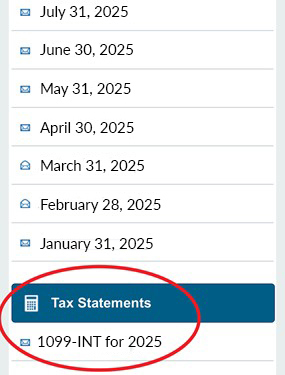
Otherwise, a copy of your tax statement(s) will be delivered to you if you receive printed statements by mail.
Additional Notes
- If you maintain multiple account numbers, you will receive a 1099-INT for each account that earned $10 more in dividends.
- You will not receive a 1099-INT tax statement if the dividends you received on an account was less than $10.
- You will not receive a 1098 tax statement if you paid less than $600 of interest on a HELOC.
- If you obtained a mortgage loan through APFCU, your mortgage is being serviced by CUSO of Hawaii Services. For more information and assistance, visit the CUSO of Hawaii website or call 808-539-0172 (U.S. toll free 1-800-708-2876).
- You can log into Online Banking through this website and entering your login credentials in the Sign In box. Click on 'Online eStatements' to download and print your tax statement(s).
- If you closed your Rebels CU or Aloha Pacific account, or paid off your HELOC before December 31, please refer to the last statement you received.